Is my subscription renewed automatically?
Yes. uPlay uses automatic renewal, which means you never have to worry about manually renewing your subscription. The system works the same way as other modern streaming services — payment is handled in the background and you keep watching without interruption.
How does automatic renewal work?
When you sign up for a uPlay subscription, a payment card is linked to your account. Depending on the plan you've chosen, payment is then automatically charged monthly, annually or every two years — on the exact renewal date.
You don't need to log in, approve anything or make a new purchase. Everything takes care of itself.
Keep an eye on the date yourself
We do not send a reminder before the renewal. The date is shown on your account page on My uPlay – on the subscription card as Next payment – and it stays the same every period. Sign up on the 14th and you are charged on the 14th.
That is where to look if you want to update your card or cancel before the next charge. Cancelling takes effect at the end of the period, so you keep access either way.
Full control via your account page
Even though renewal is automatic, you always have full control. On your account page at My uPlay you can:
- View your next renewal date – on the subscription card
- Change card – under Payment and receipts, see Change payment method
- Switch to a longer interval – under Upgrade and save next to the subscription, see below
- Cancel your subscription at any time — no lock-in period, see Cancel uPlay
No hidden terms and no complications. You're in charge.
If a payment fails
Sometimes a payment can fail — your card may have expired, funds may be insufficient or your bank may have blocked the transaction for some reason. If that happens, uPlay's system will automatically retry the payment over a short period.
You'll also receive an email notifying you of the issue so you can resolve it in time. This minimises the risk of suddenly losing access to the service.
Tips
Keep your card up to date under Payment and receipts on your account page to avoid any interruptions. It only takes a minute to change card if needed.
Frequently asked questions
Can I cancel my subscription at any time?
Yes, you can cancel your subscription at any time directly from your account page. No lock-in period, no fees and no explanations required. The service continues to work until the end of the period you've already paid for.
Will I be notified before the payment is charged?
No, we do not send a reminder before the renewal. The receipt for each successful payment is under Receipts on your account page.
Your next renewal date is always shown on the subscription card on your account page. It stays fixed from period to period, so it is easy to note down.
What happens if my card expires?
If the card is no longer valid the payment will fail and you'll receive an email about it. Change card under Payment and receipts and then tap Pay now on the subscription, and it continues right away. If you do nothing, the next automatic attempt is made with whichever card is saved at the time. See Pay a past-due invoice.
Can I switch from monthly to annual billing?
Yes. Next to the subscription, under Upgrade and save, you'll find the intervals that are longer than yours: on monthly you see yearly and two-year, on yearly you see two-year. Each option shows what it costs per month and how much you save per year. Tap the one you want.
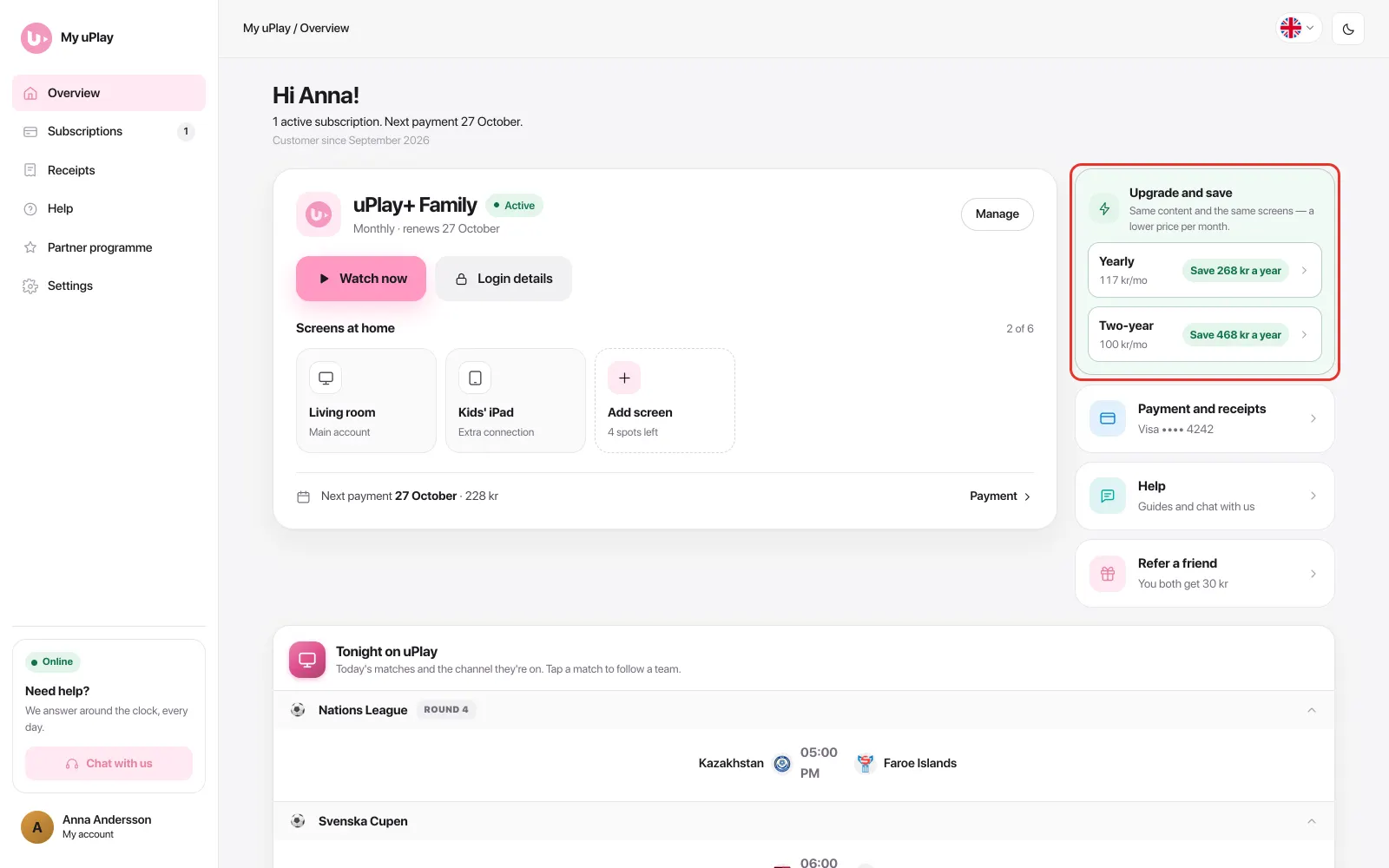
Every interval – a shorter one too – is under Manage → Billing interval on the subscription card. You decide whether the switch happens right away – in which case what you've already paid is credited – or when the period ends. A switch to a shorter period always happens when the current one ends, so you get to use what you've already paid for.
Can I move the payment date, for example to payday?
No. The subscription is prepaid: each payment buys a period in advance, and the next payment is taken on the day the paid period ends. Moving the date later would leave days nobody has paid for, and moving it earlier would mean paying for days you have already paid for. The payment date therefore always follows the period.
Summary
- Your subscription renews automatically — no manual purchases required
- No reminder is sent before the charge — the date is on your account page
- Full control via your account page — change plan, update card or cancel whenever you like
- No lock-in period — you're never tied in