
How to cancel your uPlay subscription
There is no lock-in period with uPlay and you can cancel your subscription at any time. You don't need to contact support – everything is handled from your account page on My uPlay.
Step-by-step cancellation guide
Log in to My uPlay with your email address. You'll get a login link by email – tap it and you're logged in.
On Overview your subscription has its own card. Tap Manage on the card, then Cancel subscription at the bottom of the box
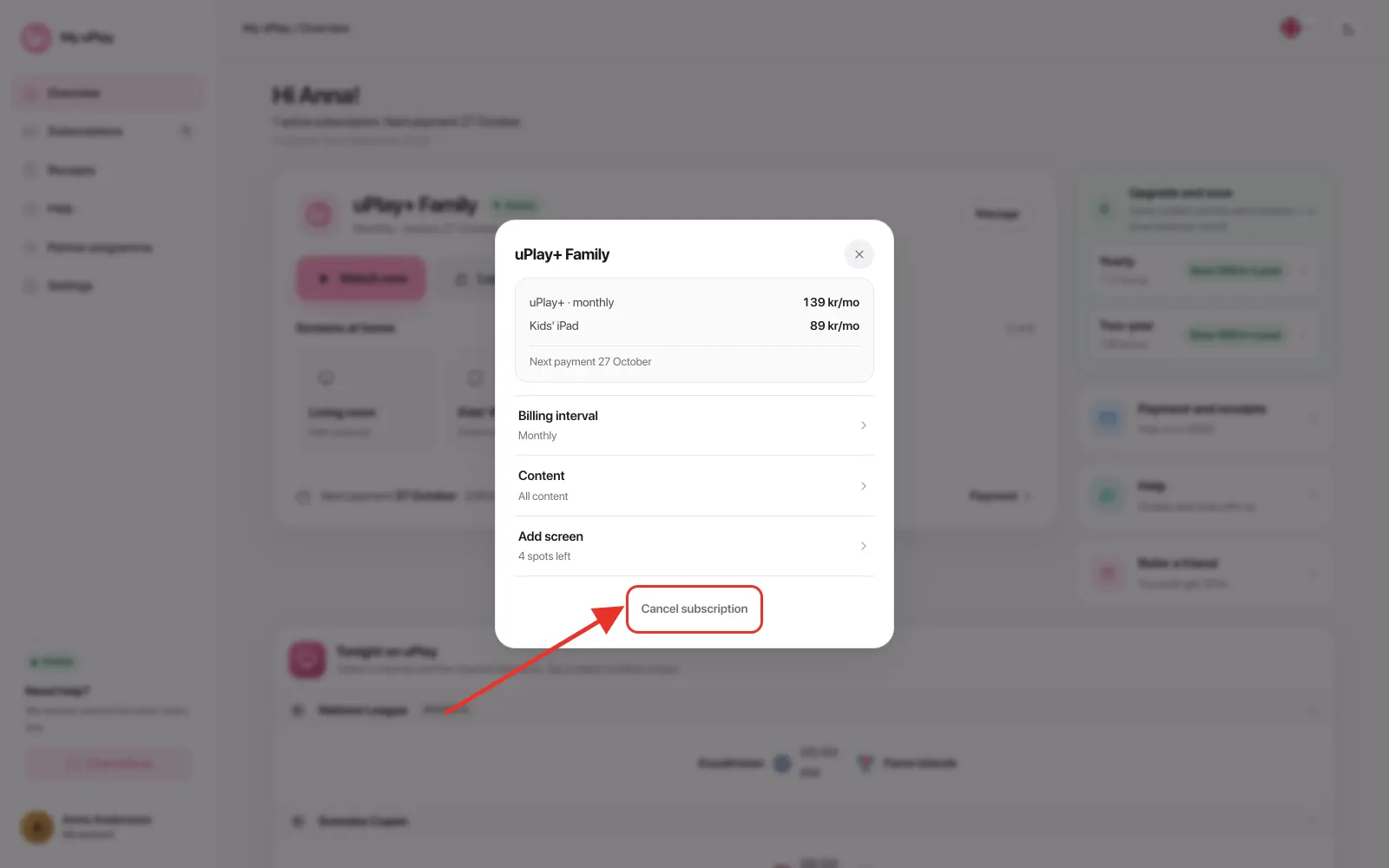
- A box asks Cancel? and shows the date your subscription keeps working until. Tap Yes, cancel
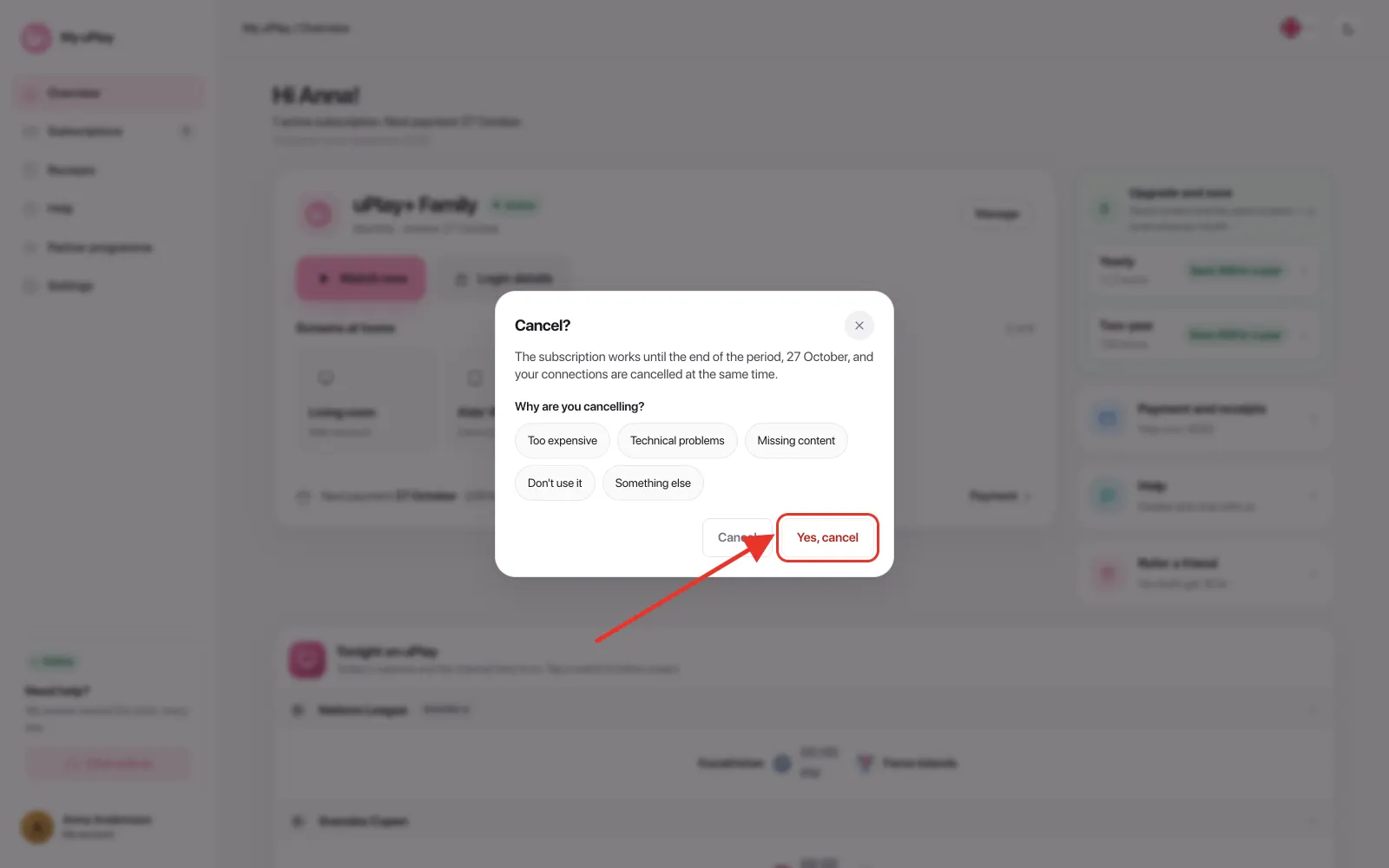
Done. You'll receive a confirmation by email, and the subscription keeps working until the end of the period – up to and including the date you have already paid for. Nothing more is charged. On your account page the subscription is marked Ending until the period is over.
If you have extra connections, they are cancelled together with the subscription they belong to. To drop just one of them: tap the screen under Screens at home, then Cancel this screen – the subscription and the other screens carry on.
Good to know
| Question | Answer |
|---|---|
| Lock-in period | None – cancel whenever you like |
| Access after cancelling | The service works until the end of the period |
| Refunds | No refunds for partially used periods |
| Extra connections | Cancelled together with the subscription |
| Undo the cancellation | Tap Resume on your account page as long as the period hasn't ended – nothing is charged |
| After the period ends | The subscription moves to Ended and can be started again with Resume |
Frequently asked questions
Will I get a refund if I cancel in the middle of a billing period?
No. You keep full access to the service until the end of the period you have already paid for, but there is no refund for the remaining time.
How do I know when my subscription ends?
You receive a confirmation by email as soon as the cancellation is registered. On your account page the subscription is marked Ending, together with the date it works until.
Can I pause my subscription instead of cancelling?
No, there is no pause feature. If you want a break, cancel the subscription and start it again with Resume when you're ready – it stays on your account page under Ended.
I've cancelled but want to keep going – can I undo it?
Yes, and you do it yourself on your account page. How it works depends on whether the period has ended:
The period hasn't ended. Tap Resume on the subscription card and confirm. The cancellation is removed and everything continues as normal – nothing is charged now, and the next payment happens on the usual date.
The period has ended. The subscription has its own row under Ended at the bottom of your account page. Tap Resume on the row. You then pay for a new period, and the service starts again once the payment has gone through. The box shows what you'll pay before you confirm – if the price for new customers has changed since you left, today's price applies.
What happens if I don't cancel before the renewal date?
Your subscription renews automatically for the next period and the payment is charged as normal. Cancel in good time if you don't want to renew.
Is my saved card removed when I cancel?
No. The card stays stored encrypted with the payment provider, so that you can resume. If you want everything gone: Settings → Delete account at the bottom. Your subscriptions are then cancelled right away and keep working until the end of the period, and after seven days the account and the saved card are deleted. Until then you can change your mind. Receipts are kept for seven years, as accounting law requires.
Can I restart my subscription after it has ended?
Yes. Tap Resume on the ended subscription on your account page, or sign up for a new one at uplay.se.
Need help?
If you run into any problems, our support is available in the chat on My uPlay, 24 hours a day, 7 days a week. See Contact support.