
Does IPTV Smarters Pro work with uPlay?
We no longer recommend IPTV Smarters Pro. The app has disappeared and stopped working for most people. There is nothing wrong with your account: the same details work in other apps, and switching takes a few minutes.
Choose this app instead
| Your device | App | Guide |
|---|---|---|
| Samsung smart TVs | BobPlayer | BobPlayer |
| LG smart TVs | IBO Player | IBO Player |
| Apple TV, iPhone and iPad | UHF | UHF |
| Android TV, Google TV and Chromecast | TiviMate | IPTV on Android TV and Google TV |
| Fire TV Stick | TiviMate | IPTV on Fire TV Stick |
| Android phones and tablets | MYTVOnline+ or Opus IPTV | App for Android |
| Computer | IBO Player or the browser | IPTV on your computer |
How to move your account to a new app
- Install the app for your device according to the table.
- Select Xtream Codes when the app asks how you want to add a playlist.
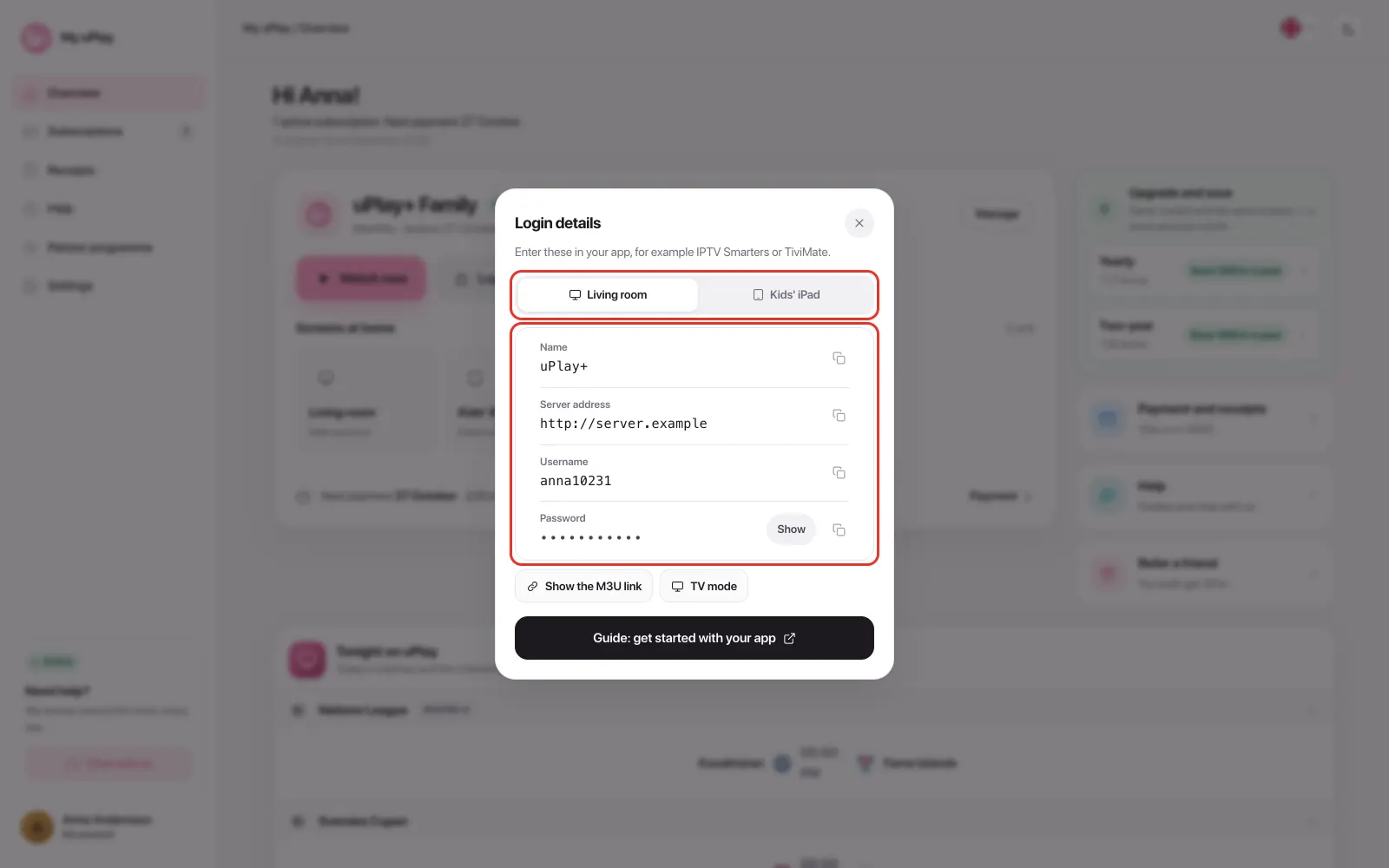
- Fill in the server address, username and password. They are the same three details you used in IPTV Smarters Pro.
At uPlay you find the details under Login details on My uPlay.
Favourites and settings are stored in the app, not in the account, so you set them up again in the new app.
Apps with similar names
The app stores have several apps called something like "IPTV Smarters". If the app shows a demo list instead of your channels, it is another app with a similar name. Switch to one of the apps in the table above.
If you still have the app and it works
Then you add your account with Xtream Codes. Choose to log in with Xtream Codes API and fill in any name, the username, the password and the server address. The server address must start with http://. The app is not ours, so we can't offer support for it.
Frequently asked questions
Why did IPTV Smarters Pro disappear?
We don't know. The app is not ours, and we have no insight into why it was removed.
Do I have to change subscription when I change app?
No. The app is just a shell that shows the content. The subscription and the details are the same in every app.
Do the new apps cost anything?
That is up to each app. UHF is free with an optional Pro version, TiviMate requires Premium for movies and series, and IBO Player has a seven-day trial and is then activated per device. The fees go to the apps and have nothing to do with your IPTV subscription.
The live channels won't start in the new app
Select MPEG-TS or TS under stream format in the app's settings. uPlay broadcasts live as MPEG-TS, and an app set to HLS shows an error or a black picture.
I use another app that isn't listed here
uPlay works in most apps that take Xtream Codes. See Other IPTV apps.
Summary
- IPTV Smarters Pro has disappeared and stopped working for most people
- Choose BobPlayer on Samsung, IBO Player on LG and other smart TVs, UHF on Apple and TiviMate on Android TV and Fire TV
- The same server address, username and password apply in the new app
- Always add your account with Xtream Codes